


Bola Capture
3.94.00 Reviews
App Specs
- Version
- 0.0.5
- Updated On
- License
- Free
- Downloads
- 50,000+
- Developer
- KAYAC Inc.
- Categories
- Action
- Platform
- Android
Screenshots
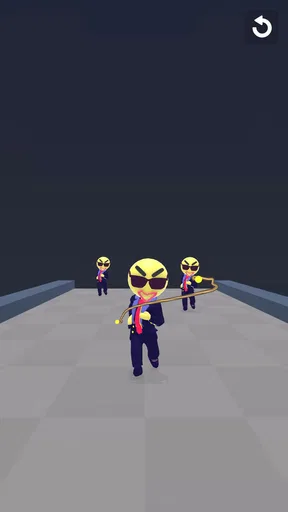
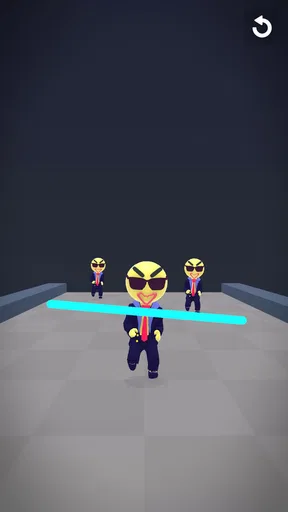
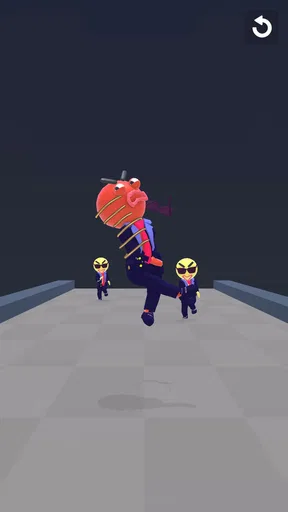
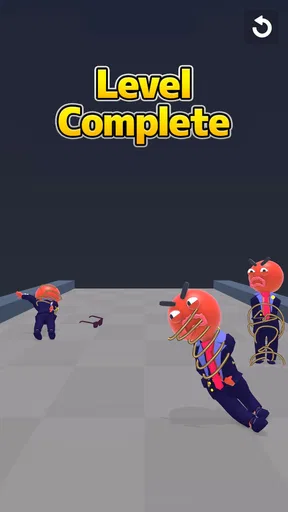
 Analysis by AppCompare
Bola Capture is the kind of action game I open when I want a quick test of timing rather than a long campaign. The idea is immediately readable: I drag to choose a direction, release the bola, and try to wrap up the ragdolls on the screen. That simple starting point makes it easy to understand, but the real challenge comes from judging angles, controlling momentum, and deciding which target should be handled first.
Developed by KAYAC Inc., this free game has a playful physical feel that suits short sessions. I do not need to learn a complicated control scheme before getting started, and the action stays focused on one central task. At the same time, it is not completely mindless. A careless fling can leave a target untouched or create a less useful position for the next attempt, so even a small screen can become a compact puzzle about space and order.
The game is listed in the action category and carries a Teen content rating. Its average rating is 3.8 from 43 ratings, while the game has passed 50K+ installs. Those figures suggest a modest but real audience rather than a huge mainstream release. I would approach it as a lightweight pick-up-and-play title, not as a replacement for a deep action game with extensive progression.
How the basic capture loop feels in practice
I find the basic capture loop works best when I treat each throw as a small aiming decision, not a reflex test: I scan the ragdolls, pick a route, then make one smooth drag. That approach also gives a useful way to judge the game over a few short sessions—whether I enjoy refining my aim, or would rather have action built around faster movement and more varied systems.
A control scheme that takes seconds to understand
My first few attempts were spent learning the relationship between the drag gesture and the bola’s path. The useful habit is to think of the gesture as an aiming line, not just a swipe. I pause briefly, look at the arrangement of ragdolls, and then pull in the direction that gives me the cleanest route. That small pause matters because the game rewards deliberate placement more than frantic movement.
The main appeal is that the controls do not get between me and the objective. There are no complicated buttons to remember in the basic interaction. I can concentrate on the position of the targets and the likely result of the throw. This makes the game approachable for someone who normally avoids action games, while still leaving room for improvement once the obvious shots stop working.
The best everyday use case is a short break when I have only a few minutes. I can play while waiting for an appointment, during a commute pause, or between other tasks without needing to reconstruct a story or remember a large inventory. The game’s compact idea works well in that setting because each attempt gives me an immediate result and a clear reason to try again.
Worth Reading Before You Choose

EA SPORTS FC Mobile 26 Is a Bigger Football Game, but It Takes Time

Flipboard Shows What News Apps Must Do Beyond the Feed

Switching to Android Auto Means Rethinking Your Driving Routine

Google Calendar Makes a Crowded Week Easier to Manage

Ludo King Makes the Most of the Minutes Between Plans

Baby Panda World Brings Quick Play to Modern Phones, but Its Game Library Feels Busy
Why the first obvious throw is not always the best one
At the beginning, I naturally aimed at the nearest ragdoll. That is a reasonable way to learn, but it is not always the most efficient choice. A target near the edge may be easier to reach now, while a central target may block a better route later. I found that looking at the whole arrangement before acting was more useful than reacting to the most visible figure.
This creates a small but satisfying layer of planning. The goal is not merely to make contact; it is to use the available space intelligently. If several ragdolls are positioned close together, I consider whether one throw can affect the group or whether a narrow approach will avoid wasting the attempt. I cannot rely on every situation behaving identically, so I treat each layout as a fresh aiming problem rather than repeating one memorized swipe.
The most useful early habit is to plan the landing area, not only the launch direction. A throw can look correct at the start and still produce a poor result if the bola reaches the wrong side of the group. Thinking about where the rope should finish helps me make better decisions and reduces random retries.
What makes the loop satisfying, and what can make it tiring
There is a pleasant physicality to sending the bola across the screen and seeing whether the ragdolls are caught. Success feels earned because the input is direct: I chose the angle, committed to the fling, and watched the outcome. That connection between gesture and result is the strongest part of the experience.
The limitation is equally clear. The basic loop is narrow. Players who need character development, a large arsenal, online competition, or a long narrative campaign will probably find the experience too focused. I also would not recommend it as the only action game on a device. Its strength is the compact challenge, and that strength can become repetition if I play for a long stretch without a change of pace.
Settings and device preparation worth checking
The game runs on devices using Android 6.0 or later, and the current version is 0.0.5. Before judging the controls, I would check that the game is updated and that the phone is comfortable for repeated dragging. A clean screen, a stable grip, and enough room for a full gesture make a bigger practical difference here than they might in a menu-heavy game.
I also recommend checking the device’s usual sound and notification settings before starting a session. The game is easy to use in short bursts, but unexpected interruptions can break concentration just as I am lining up a throw. If I am playing in a public place, I keep the phone at a comfortable brightness and use the device’s normal silent or low-volume mode when appropriate.
There is no reason to complicate the setup with accessories. A finger is enough for the core interaction, and the game’s design is based around a direct touchscreen gesture. A stylus may feel precise on some phones, but I would not buy one specifically for this title. The important adjustment is learning how much screen space I personally need to make a controlled drag.
Small adjustments that improve consistency
I get better results when I begin each attempt from a repeatable part of the screen instead of starting wherever my finger happens to land. This gives me a more consistent sense of distance and direction. It also makes it easier to notice whether a miss came from a bad angle or from an overly short gesture.
Another useful adjustment is to avoid covering the target with my finger for too long. I place the starting point, drag smoothly, and release without making last-second corrections. Those corrections often come from uncertainty rather than useful information. If the shot fails, I would rather understand the original mistake than create a new one during the gesture.
For users who share a phone or alternate between portrait and landscape habits, consistency is especially valuable. I try to play in the orientation and grip that feel natural, then keep them stable for a session. Changing hand position between attempts can make the same visual angle feel different, which adds confusion that has nothing to do with the level itself.
Faster patterns for experienced players
Once the basic control feels familiar, I stop treating every ragdoll as an isolated target. I scan for clusters, open lanes, and edge positions. The first question becomes, “What arrangement gives me the most useful next throw?” rather than, “Which figure can I hit immediately?” That change in viewpoint is where the game becomes more interesting.
One pattern I use is to work from the outside toward the center when the layout is crowded. Removing an edge target can open a clearer line and reduce the chance of catching an awkward obstruction first. This is not a universal rule, but it is a good starting experiment when the middle of the screen looks congested.
In a more open arrangement, I look for the shot with the widest margin for error. A dramatic diagonal may reach a target, but a flatter route can be easier to control if it leaves more space around nearby figures. I prefer a reliable capture over a stylish angle, especially when I am trying to build a repeatable approach instead of chasing a lucky result.
A second advanced habit is to separate aiming from speed. I do not assume that the quickest gesture is the best one. A smooth, measured drag gives me more control over the intended path, while a rushed fling can make the outcome feel random. The game is action-oriented, but that does not mean every move should be hurried.
Using failed attempts as information
When I miss, I try to identify one specific cause. Did I start too close to the target? Was the angle too shallow? Did I aim at the visible body instead of the space needed for the bola to wrap around it? This simple review turns a failed attempt into a small experiment and prevents me from repeating the same gesture without learning anything.
I also avoid changing several variables at once. If the first throw is too short, I lengthen the next one while keeping the direction similar. If the direction is wrong, I adjust the angle without dramatically changing the distance. That process is slower than random swiping, but it helps me build a mental map of how the gesture behaves.
This is one of the game’s less obvious strengths: it can reward disciplined repetition without pretending to be a full training simulator. The feedback is immediate enough for quick learning, yet the interaction remains simple. Players who enjoy refining a physical input may get more from it than players who only want constant novelty.
Where the action starts to show its limits
The same simplicity that makes the game accessible also limits how much strategy I can layer onto it. The experience is built around aiming and capturing, so I should not expect the depth of a tactical action game with multiple abilities or complex enemy behavior. If my enjoyment depends on collecting equipment, customizing a character, or unlocking a large range of systems, this is probably the wrong choice.
There is also a difference between difficulty created by thought and difficulty created by awkward input. On a small screen, my finger can obscure the exact point I am targeting, especially when several ragdolls overlap visually. I found that using a slower gesture helps, but it cannot remove the basic limitation of touchscreen aiming. People with larger hands or a smaller phone may need more patience than someone playing on a spacious display.
Another trade-off is session length. The game is well suited to brief attempts, but its focused loop may not sustain a long evening for everyone. I would choose a broader action title when I want exploration, varied combat, or a sense of ongoing progression. I would choose this one when I want a direct challenge that starts almost immediately.
Who will enjoy it most
I think the best audience is someone who likes physics-flavored interactions, compact puzzles, and action games that can be played with one central gesture. It is also a sensible option for a casual player who wants something more involving than tapping through menus but less demanding than a traditional action campaign.
It may work particularly well for people who enjoy improving through repetition. The game gives me a reason to replay a situation: not because I need to grind resources, but because I want to find a cleaner angle or make fewer wasted throws. That kind of self-imposed refinement is appealing if I like chasing consistency.
I would skip it if I am looking for a substantial story, a deep multiplayer community, or a large collection of modes. The Teen rating also means I would check whether the tone and presentation suit the younger person using the device rather than assuming it is intended for every age group. Free access makes it easy to try, but it does not change the narrow focus of the gameplay.
How it compares with familiar action alternatives
Compared with a conventional arcade action game, Bola Capture asks for more spatial judgment and less rapid button input. I am not managing a character across a large map or memorizing a long attack sequence. Instead, I am solving a small aiming problem directly on the screen. That makes it calmer than many action alternatives, even though each move still has an immediate physical result.
Compared with a puzzle game, it feels more tactile and less abstract. The drag-and-fling interaction gives my decisions a sense of motion, while the ragdoll arrangement provides the planning element. However, it does not offer the broad rule set or elaborate chain reactions I might find in a larger physics puzzle. Its appeal comes from doing one thing clearly rather than combining many systems.
Compared with endless runners or reflex games, it is less about reacting continuously. I have time to inspect the situation and choose a line. That makes it a better fit when I want a thoughtful break, but a weaker fit when I want constant movement and escalating speed. The right comparison depends on whether I value controlled aiming or nonstop momentum.
Practical expectations before downloading
The game is free, which lowers the risk of trying it during a spare moment. I would still set expectations correctly: free does not automatically mean expansive. Here, the value comes from the accessibility of the core interaction and the possibility of improving my technique, not from a promise of a huge content package.
Its current version, 0.0.5, also makes me view it as an early-stage release rather than a finished, feature-heavy platform. That does not prevent the central mechanic from being enjoyable, but it encourages me to judge the game on the quality of its current aiming loop. Players who prefer mature games with years of accumulated systems may be more comfortable choosing an established alternative.
The install footprint is not the main reason I would choose it, but the reported 50K+ installs show that it has reached beyond a tiny personal experiment. I would treat that as a sign that the concept is easy for people to understand, while remembering that a moderate audience does not guarantee that its focused style will suit me personally.
My verdict after settling into the rhythm
After spending time with it, I see Bola Capture as a neat, specialized action game rather than an all-purpose mobile recommendation. Its best moments come from lining up a difficult shot, committing to the gesture, and understanding why the bola succeeded or failed. The controls are friendly enough for a newcomer, but the game rewards experienced players who develop repeatable aiming habits.
My preferred routine is simple: I inspect the full arrangement, choose the target order, begin from a consistent point, and make one smooth drag. If the result is poor, I change one part of the next attempt instead of swiping randomly. That workflow makes the experience feel more deliberate and gives the short sessions a clear purpose.
I recommend it to anyone who wants a free, focused touchscreen challenge built around aiming and spatial decisions. I would not recommend it to someone expecting a large action adventure, extensive progression, or endless variety. For the right player, its narrow design is not a weakness; it is the reason the game is easy to pick up and satisfying to refine.
KAYAC Inc. has centered the experience on a single readable idea, and that idea works best when I give it attention rather than rushing through it. If I approach each throw as a small tactical choice, the game has enough character to earn repeated short visits. If I need a broader action package, I would look elsewhere, but as a compact bola-aiming challenge, it is worth trying.
Pros
- Quickly captures and saves photos or videos from supported sources.
- Simple interface makes the main capture tools easy to find.
- Useful for recording moments without navigating through complex menus.
- Media can be reviewed immediately after capture.
- Lightweight design should run smoothly on many modern devices.
Cons
- Compatibility may vary across devices
- cameras
- or connected accessories.
- Some features may require permissions that concern privacy-conscious users.
- Captured files can use considerable storage space over time.
- Editing and organization tools may feel limited for advanced users.
- Performance may depend on lighting
- connection quality
- and device hardware.
FAQs for Bola Capture
What is Bola Capture and how does it work?
Bola Capture is a mobile application focused on capturing, organizing, and sharing visual content from your device. After installation, users can access the camera or select existing images, apply the available capture or editing options, and save or share the result. The exact tools and behavior may vary depending on the app version, device model, and operating system.
Is Bola Capture free to download and use?
Bola Capture may be available as a free download, but users should review the store listing carefully before installing because some features can depend on in-app purchases, advertising, subscriptions, or account requirements. The free version may provide the core experience while reserving advanced tools or additional content for paid access. Pricing and availability can differ by country.
What permissions does Bola Capture require?
Because Bola Capture is designed around capturing or handling visual content, it may request access to the camera, photos, media files, or device storage. These permissions are generally needed for the app’s main functions, but you can review and change them later in your phone’s settings. Only grant access that you consider appropriate, and check the privacy policy before using sensitive content.
Is Bola Capture compatible with Android and iPhone devices?
Compatibility depends on the version of Bola Capture available in the Google Play Store or Apple App Store, as well as the operating system installed on your device. Before downloading, check the app’s store page for minimum system requirements, supported devices, and the latest update date. Older phones may experience reduced performance or may not support every feature.
Is Bola Capture safe to install and use?
Bola Capture should be downloaded only from an official app store or a verified source to reduce the risk of modified or harmful files. Before installation, review the developer information, user ratings, requested permissions, privacy details, and recent reviews. Avoid sharing private images or personal information until you understand how the app stores, processes, and potentially shares your data.


